
01The New Search
How site selectors are actually finding communities today
The site selection process has changed. Corporate location decisions — whether for a distribution center, a manufacturing plant, a regional headquarters, or a data center — now begin with data, not phone calls.
A site selector's first move is to open a platform and start filtering. They are evaluating:
Workforce demographics
Available labor, wage rates, education levels, and commute patterns.
Infrastructure readiness
Power capacity, water, fiber, rail, and highway access.
Buildings & shovel-ready sites
Available buildings and sites — certified, zoned, and priced.
Incentive programs
Tax abatements, grants, training subsidies, and utility incentives.
Economic development contacts
Who do they call, and what is that community's track record?
If your community isn't surfacing when those filters are applied, you simply do not exist in that decision process — no matter how strong your actual offering is.
02Cost of Invisibility
The problem with being invisible at the moment of search
Consider what happens when a site selector opens a location intelligence platform and your community is not represented:
- Your region gets filtered out before human judgment ever enters the picture.
- A neighboring community with a listed Economic Developer gets the call.
- Your shovel-ready sites, your incentives, your trained workforce — none of it matters because none of it was found.
The challenge isn't awareness in a general sense. It's presence at the precise moment a decision is being made. That moment is now happening inside platforms like FastLocations.
Our commitment to your visibility
We act as your extended marketing arm. While you focus on local economic growth, we drive the audience to your door through:
Industry-leading media
Strategic placement and featured content in Area Development Online and Area Development Magazine. Explore our latest analysis in FastReads.
Direct outreach
High-frequency, targeted email campaigns to our curated database of site selectors and corporate real estate executives.
Social amplification
Consistent visibility via our active LinkedIn and YouTube presence and partnerships with the industry's most trusted voices.
03How It Works
What FastLocations does — and why it changes the equation
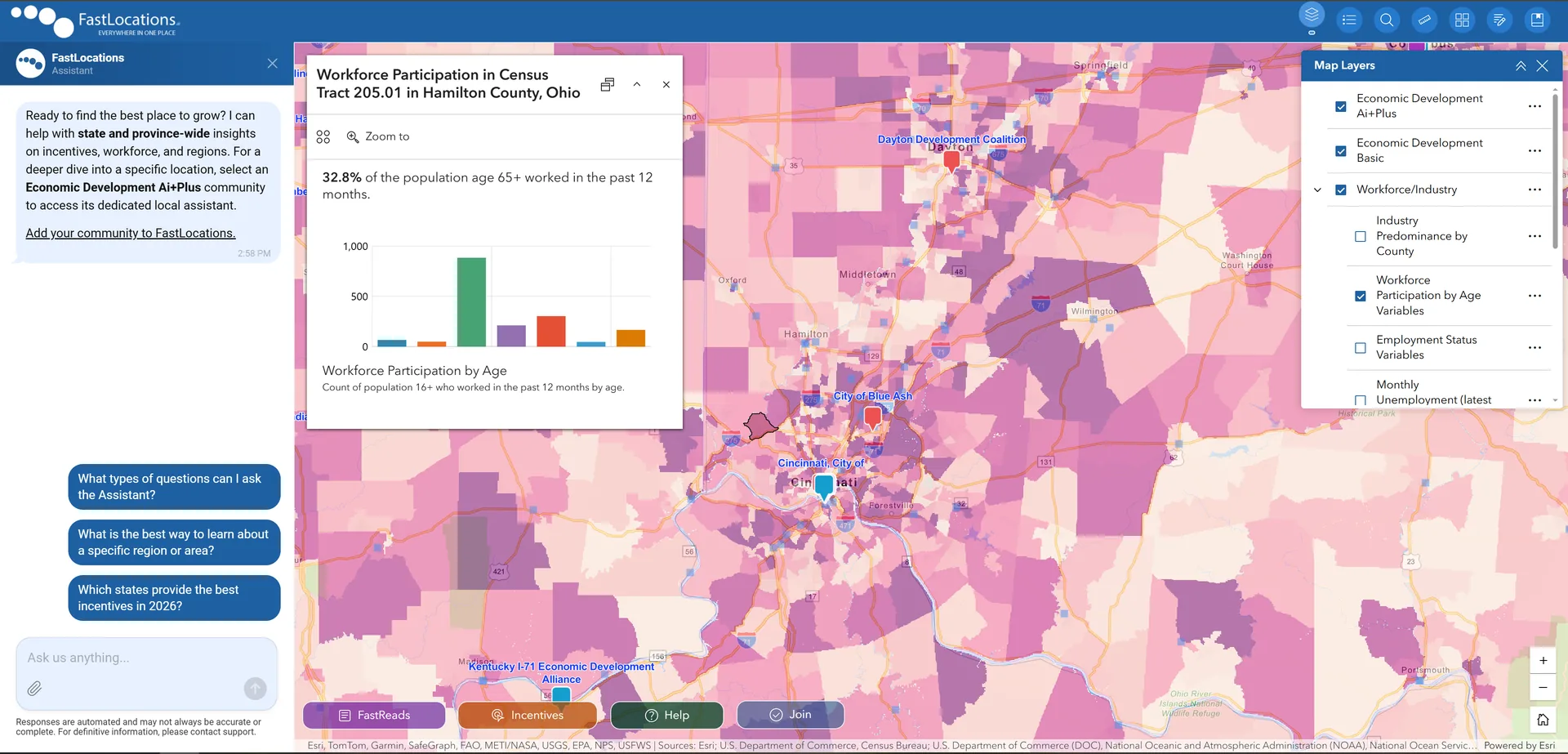
FastLocations is an AI-powered site selection platform that aggregates location data, available properties, and economic development expertise into a single, searchable interface used by corporate site selectors.
Think of it as a digital convention floor — the kind you would normally only appear at if you had a budget and a team to attend in person. On FastLocations, your community has a presence at that convention 24 hours a day, seven days a week.
AI-powered assistant
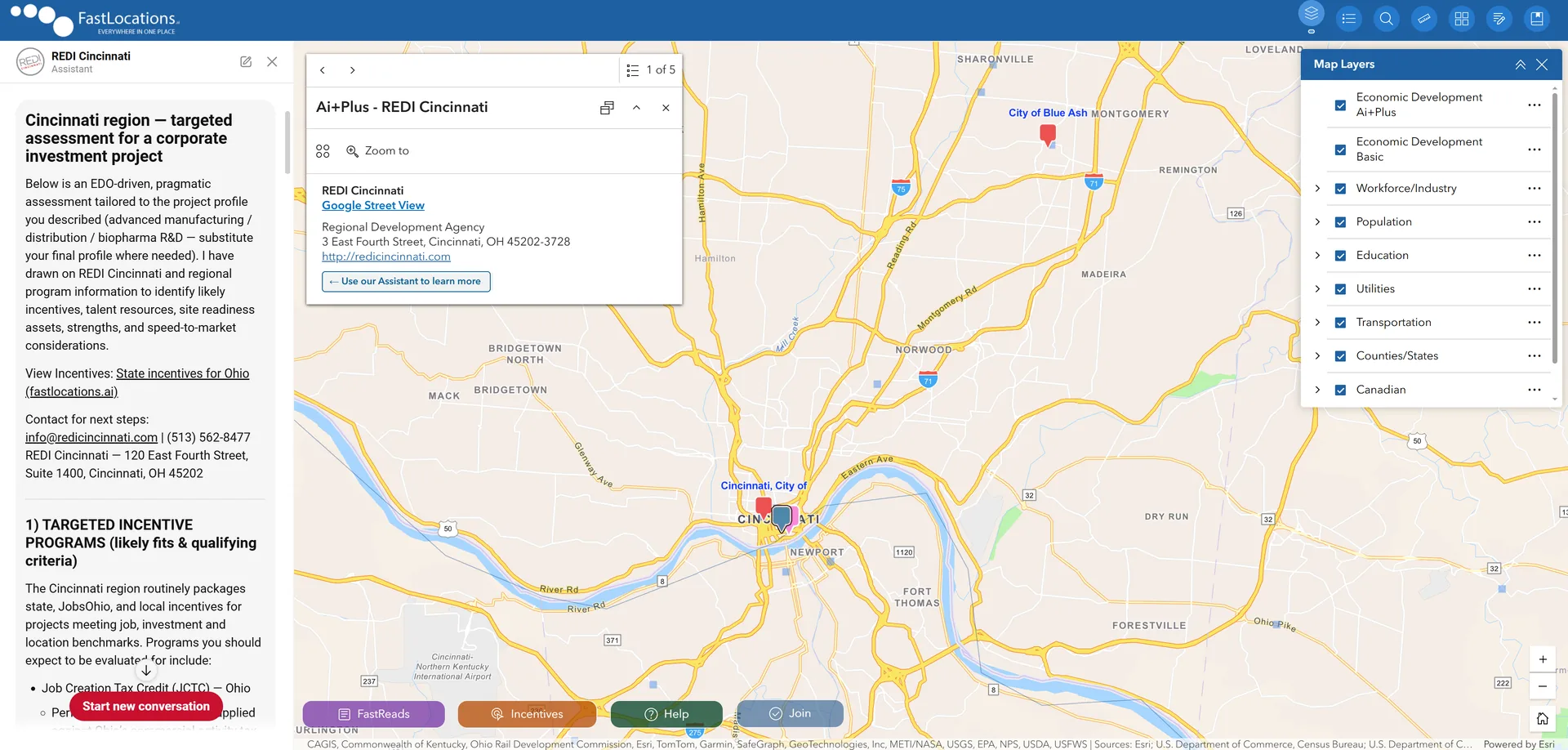
When a site selector clicks on your Economic Development region, the platform's AI instantly switches context — it "becomes" your digital aide, drawing from your specific data, incentives, available sites, and regional knowledge.
Layered map data
Site selectors explore workforce, infrastructure, transportation, utilities, and available properties — all overlaid on the same interactive map.
Real-time expertise
The site selector isn't getting generic data. They are having a conversation with an AI that knows your incentive programs, your zoning rules, and your contact information.
An active intelligence tool
FastLocations is not a passive directory — it is an active platform working for you 24/7.
▶Platform Demonstrations
See the platform in action
Watch how FastLocations works — and how it puts your community's story in front of the right people at exactly the right moment.
04Site Selector Experience
What a site selector sees when your community is listed
When a site selector opens FastLocations and finds your region, here is what their experience looks like — and why it works in your favor.
-
They find your region on the map
Your Economic Development Agency icon appears on the layered map alongside your available properties and demographic overlays.
-
The AI becomes your representative
The assistant updates to reflect your organization — "Now chatting with: [Your Agency Name] Assistant."
-
They ask questions. Your data answers.
Specific questions get specific answers, drawn from your sites, programs, and contacts.
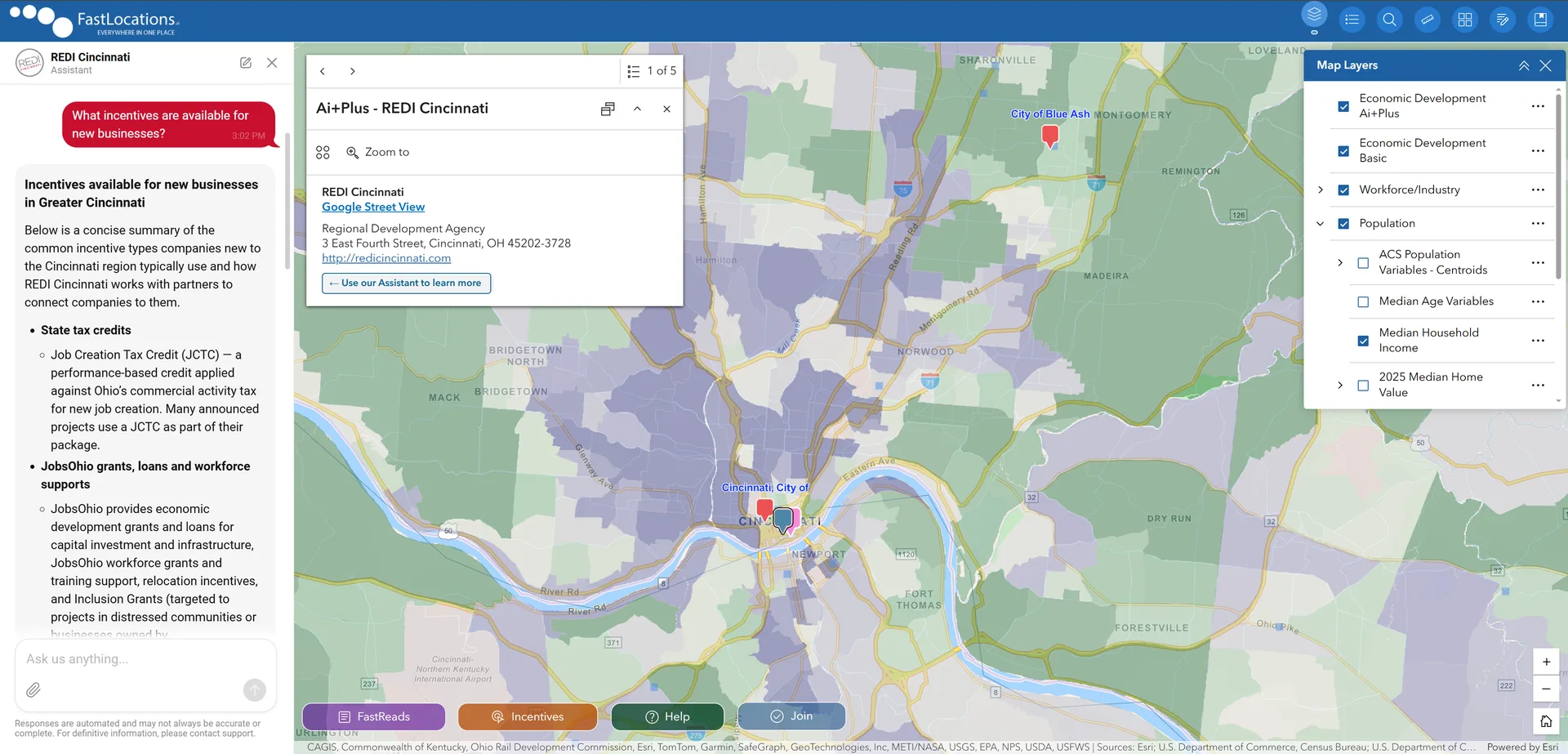
Our AI Assistants are trained on real regional data — and sometimes they really shine. Browse a curated selection of favorite answers delivered by the FastLocations Assistant across economic development organizations nationwide.
05When to Expand · Stay or Grow
Expansion decisions start before the search does
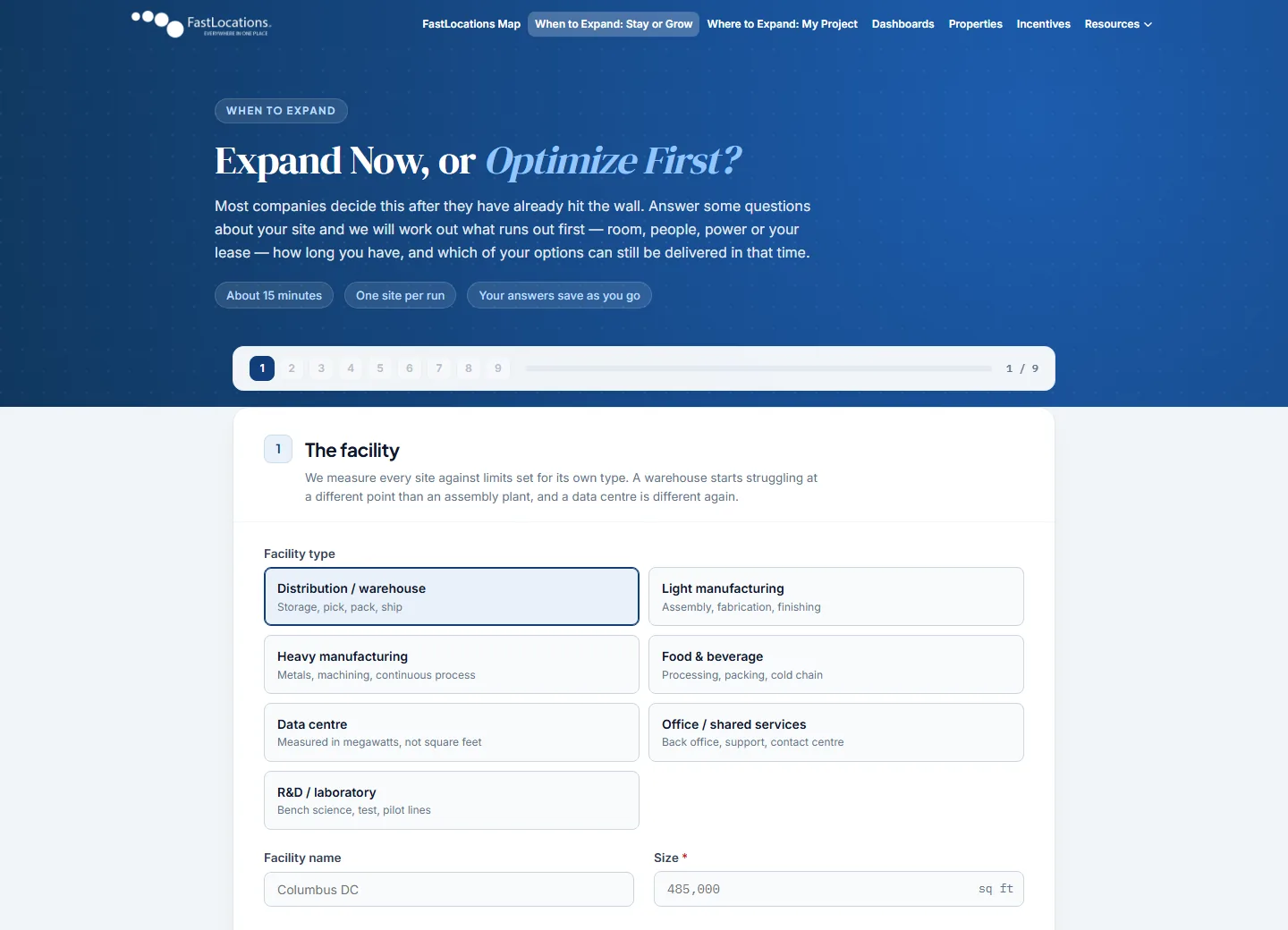
Stay or Grow helps a company decide whether to expand now or optimize first. It asks questions about one existing site, then works out what runs out first — room, people, power, water, docks, or the lease — how many months of runway remain, and which options can still be delivered inside that window.
What the company gets
- The binding constraint, and a runway table across all six constraints.
- Options assessed against the delivery window — adding a shift, overflow space, expanding in place, a lease, a build-to-suit, or a greenfield.
- A draft Strategic Expansion Plan as a Word document.
- A one-click handoff to My Project when the answer points somewhere other than the current site.
Why it matters to your EDO
Companies arrive at the location search already knowing what binds first and by when — so the first conversation with your team is specific, not exploratory.
It's also a retention tool. Share it with local employers who are running short of room, people, or power, and you hear about expansion pressure while there is still time to keep that growth in your community.
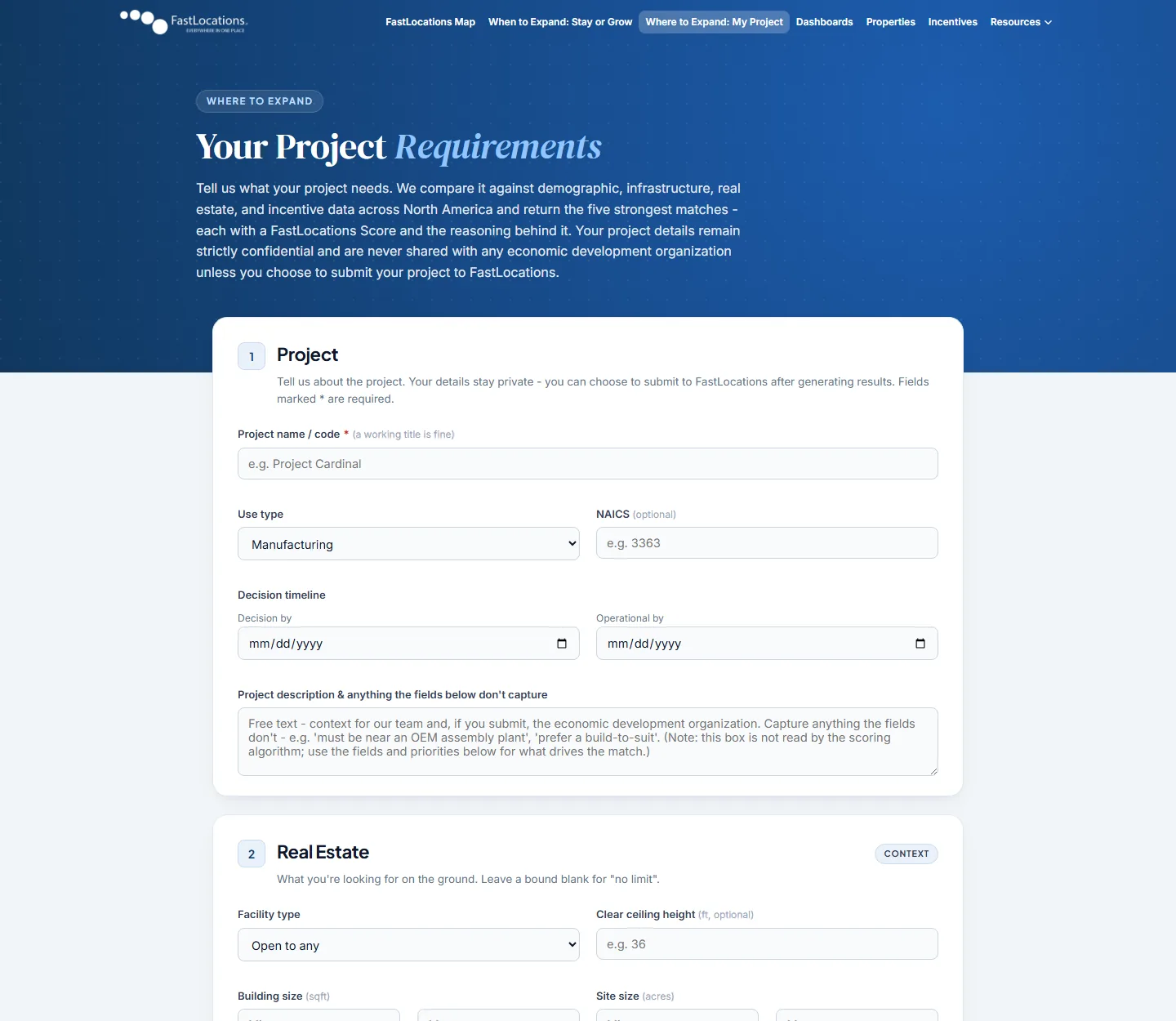
06Where to Expand · My Project
Where site selectors turn requirements into a shortlist
My Project captures a project's parameters — CapEx, hiring headcount, wage targets, utility demand, and logistics constraints — and runs multi-factor scoring against North American markets. It returns the five strongest matches, each with a FastLocations Score and the reasoning behind it.
What the site selector gets
- Ranked location matches scored against demographic, real estate, infrastructure, and incentive data.
- A draft Strategic Expansion Plan with candidate locations, EDO contacts, and dashboard links.
- Figures carried across from Stay or Grow, so nothing is typed twice.
- Confidentiality — project details are never shared with any organization.
Why it matters to your EDO
The scoring runs on the same kinds of data your listing supplies: real estate, infrastructure, and incentives. The more complete and current your data, the better your community can be represented when a project is matched.
When your community makes the shortlist, the plan the site selector takes away includes your contact details and your dashboard — a direct line to your team.
07Ai+Plus Dashboards
Your region's full profile, in one view
Every Ai+Plus organization on the map has an Ai+Plus Dashboard — a data-rich profile page that goes well beyond the chat, with your AI Assistant built right in.
What site selectors see
- Key stats — population, unemployment, commercial electricity cost, and state incentive count — each with its five-year movement.
- Workforce, education, and industry location quotient charts.
- Housing, permitting timelines, major employers, and nearby post-secondary institutions.
- Talent acquisition channels: local recruiters and the job boards candidates use.
- Power & Energy: published electricity prices, the nearest high-voltage substations, and available capacity, including the records you verify in the EDO Portal.
- A Video Library of your organization's own videos, and the incentive programs you submit, featured first. You manage both in the EDO Portal.
Why it matters to your EDO
Every dashboard has a Compare button that puts your region side by side with any other organization — population, unemployment, electric rates, tax structure, FTZ and Opportunity Zone status, TIF activity, and STEM credential output.
Site selectors are going to compare you anyway. Your dashboard makes sure that comparison uses your data.
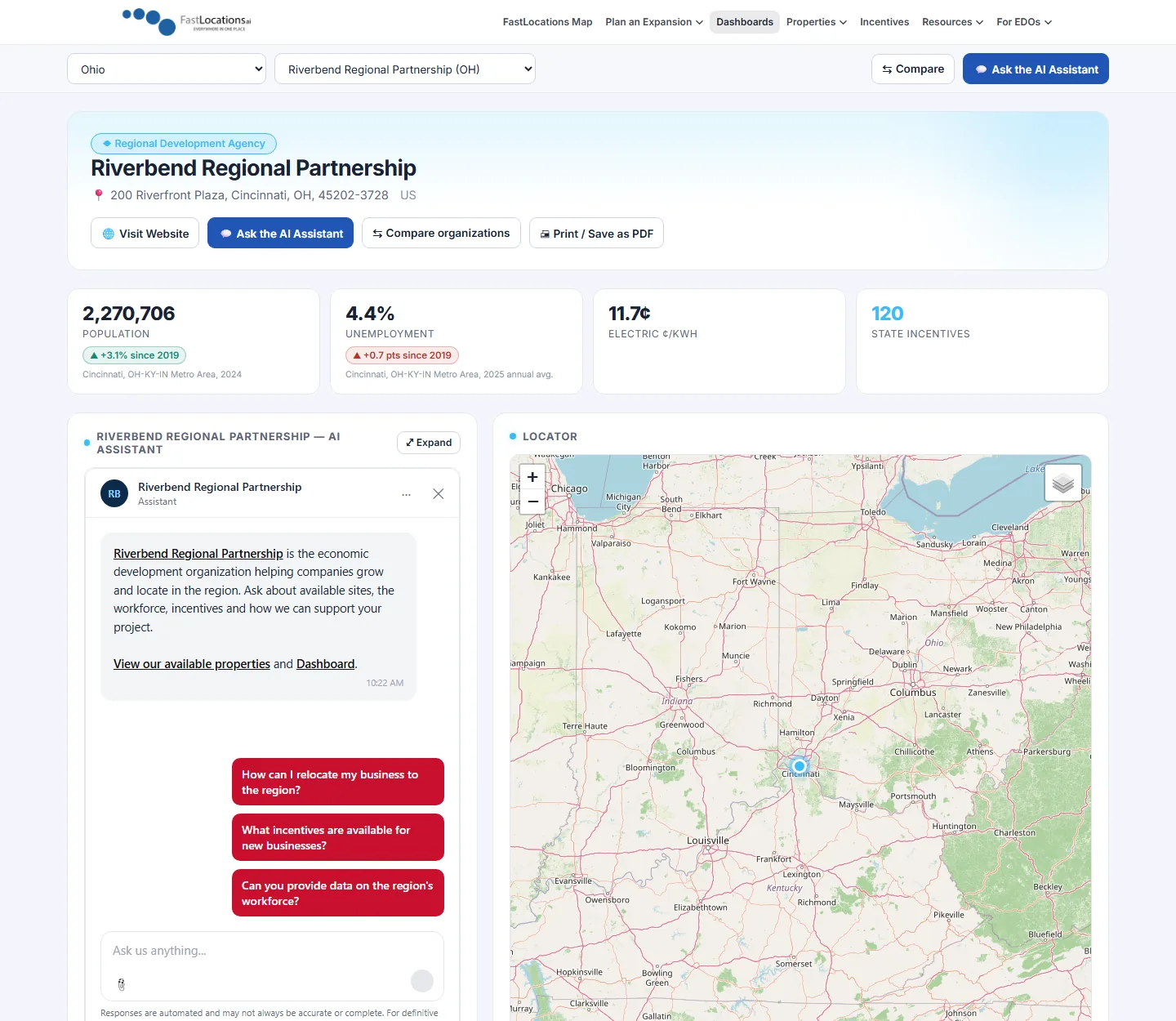
Dashboard overview (example organization)
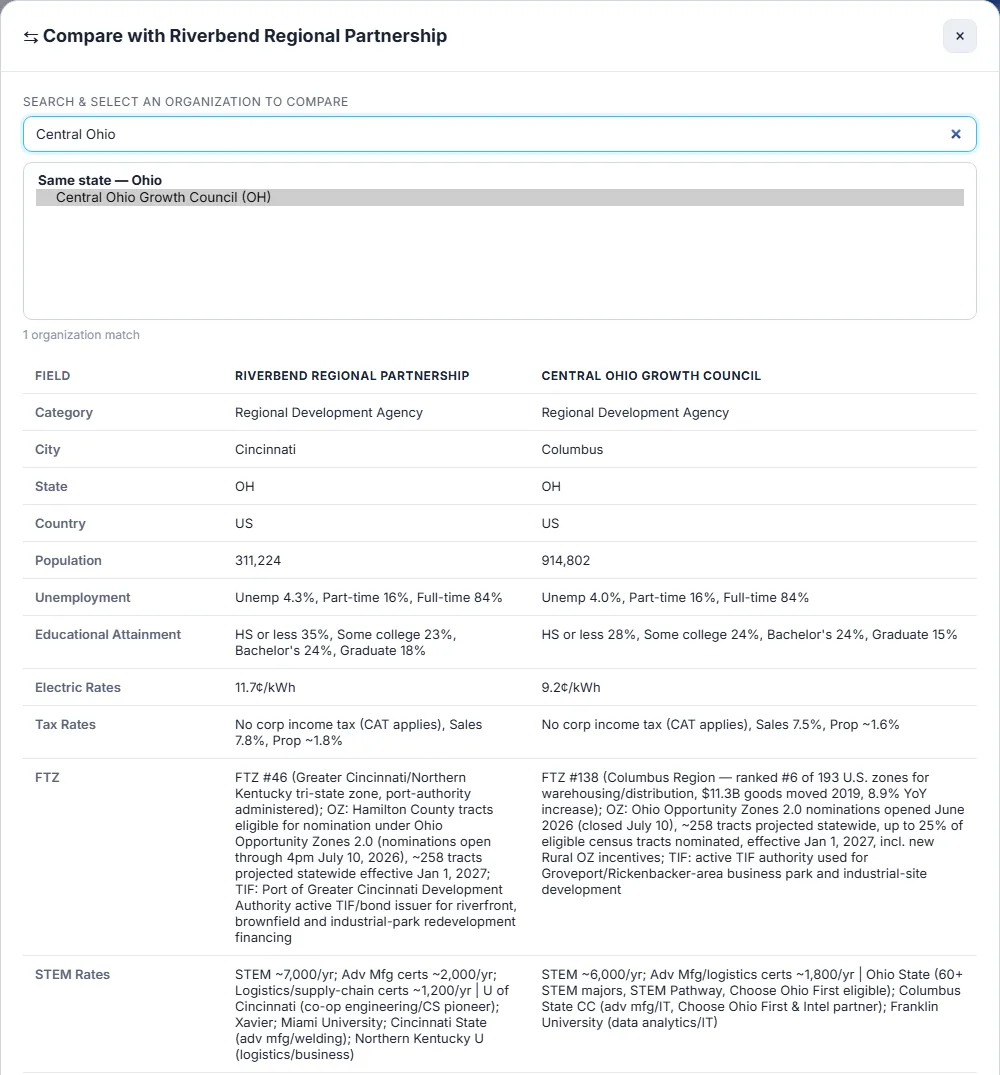
Compare, side by side (example organizations)
08Properties · Property Explorer
Your sites and buildings, where site selectors search
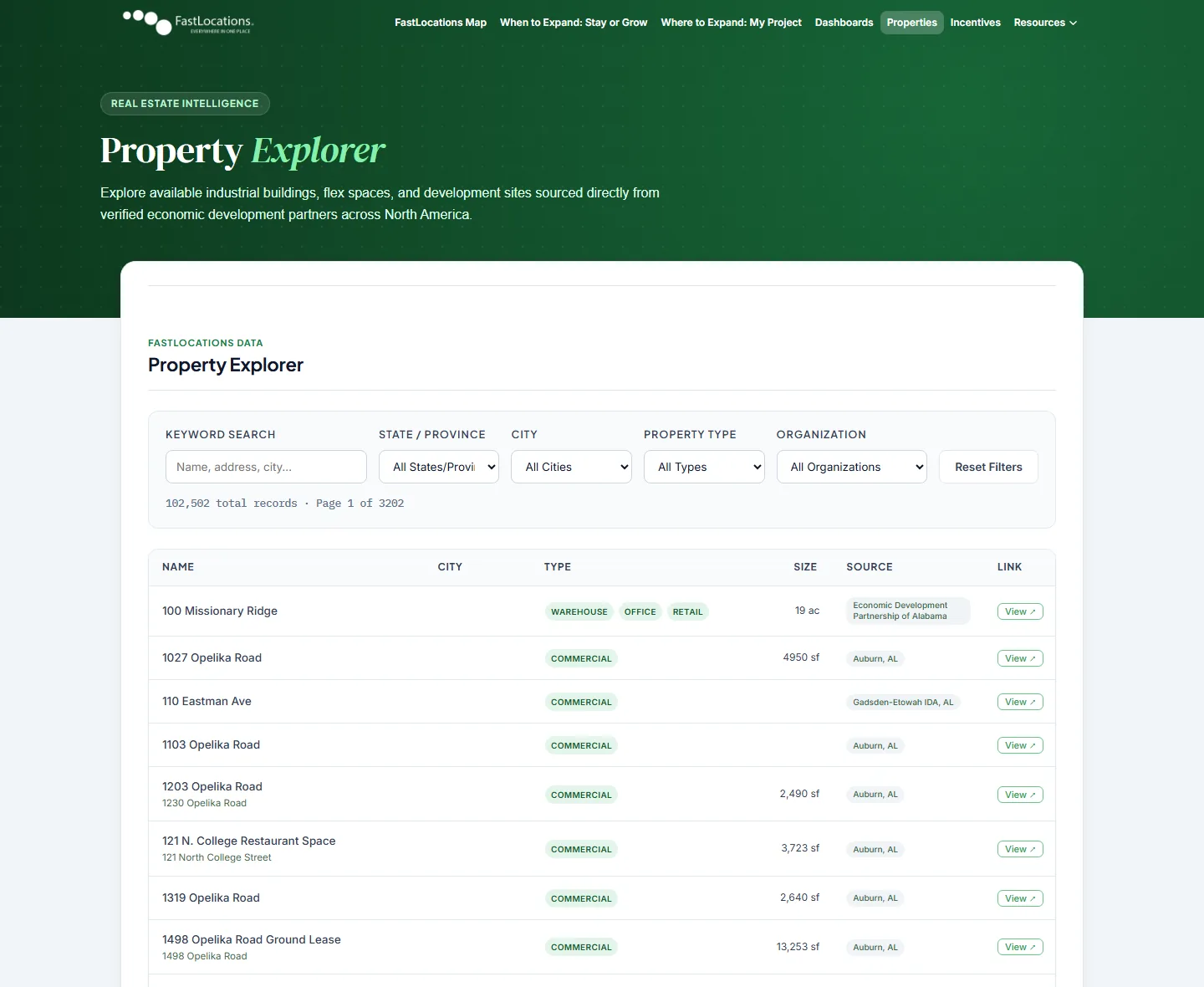
The Property Explorer brings tens of thousands of verified commercial, industrial, and development site listings from participating Economic Development Organizations together in one searchable view.
What site selectors do
- Filter listings by building square footage, site acreage, ceiling clear height, and asset class.
- Review utility capacity, zoning status, and local incentive eligibility where the EDO provides them.
- Ask your Assistant about zoning approval timelines and infrastructure capacity for a specific site.
Why it matters to your EDO
Your listings come from your own property database — including listings hosted through third-party services on your website — with links back to the original source. You keep one system of record, and your sites show up where site selectors are already searching.
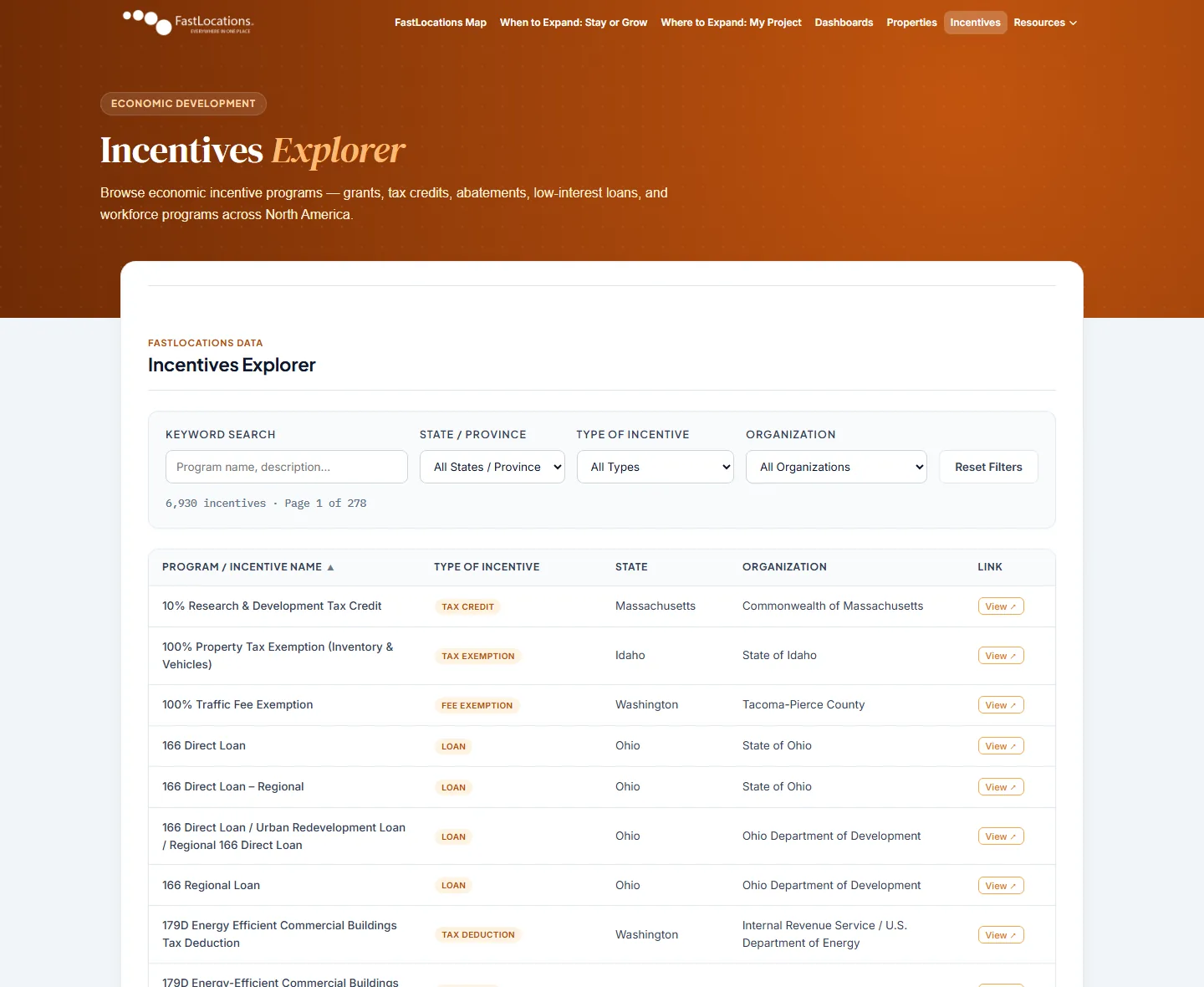
09Incentives · Incentives Explorer
The tool site selectors use to search your programs
The conversation your AI Assistant has with a site selector is only as powerful as the data behind it. FastLocations gives site selectors direct access to a searchable database of economic incentive programs populated with verified data.
What site selectors get
- 6,900+ incentive programs cataloged across North America, with key program terms surfaced in a single click.
- Program detail views showing the administering organization, eligible funding ranges, plain-language criteria, and official links.
- Filters by incentive type to match exact project parameters.
Why it matters to your EDO
The Incentives Explorer is a searchable catalog of tax credits, grants, loans, rebates, and rate discounts drawn from local, state and provincial, federal, and utility sources — so your programs sit alongside everything else a project could stack with them.
10Your Profile
What you control: your profile, your story, your data
Being on FastLocations does not mean surrendering control of your message. Your listing is built from data you own and approve. Our Assistants are trained directly from your website and any additional documentation you provide.
Your listing can include:
Properties & certified sites
Industrial, commercial, and mixed-use, with full specifications.
Incentive programs
Local, state and provincial, federal, and utility-based.
Workforce & demographics
Tied to your region's actual labor shed.
Infrastructure details
Commercial and industrial electric rates, power capacity, broadband, water and wastewater, rail, and port access.
Direct contact information
Warm leads route directly back to your team.
Your narrative
Intelligent AI ensures your strengths are presented with impact.
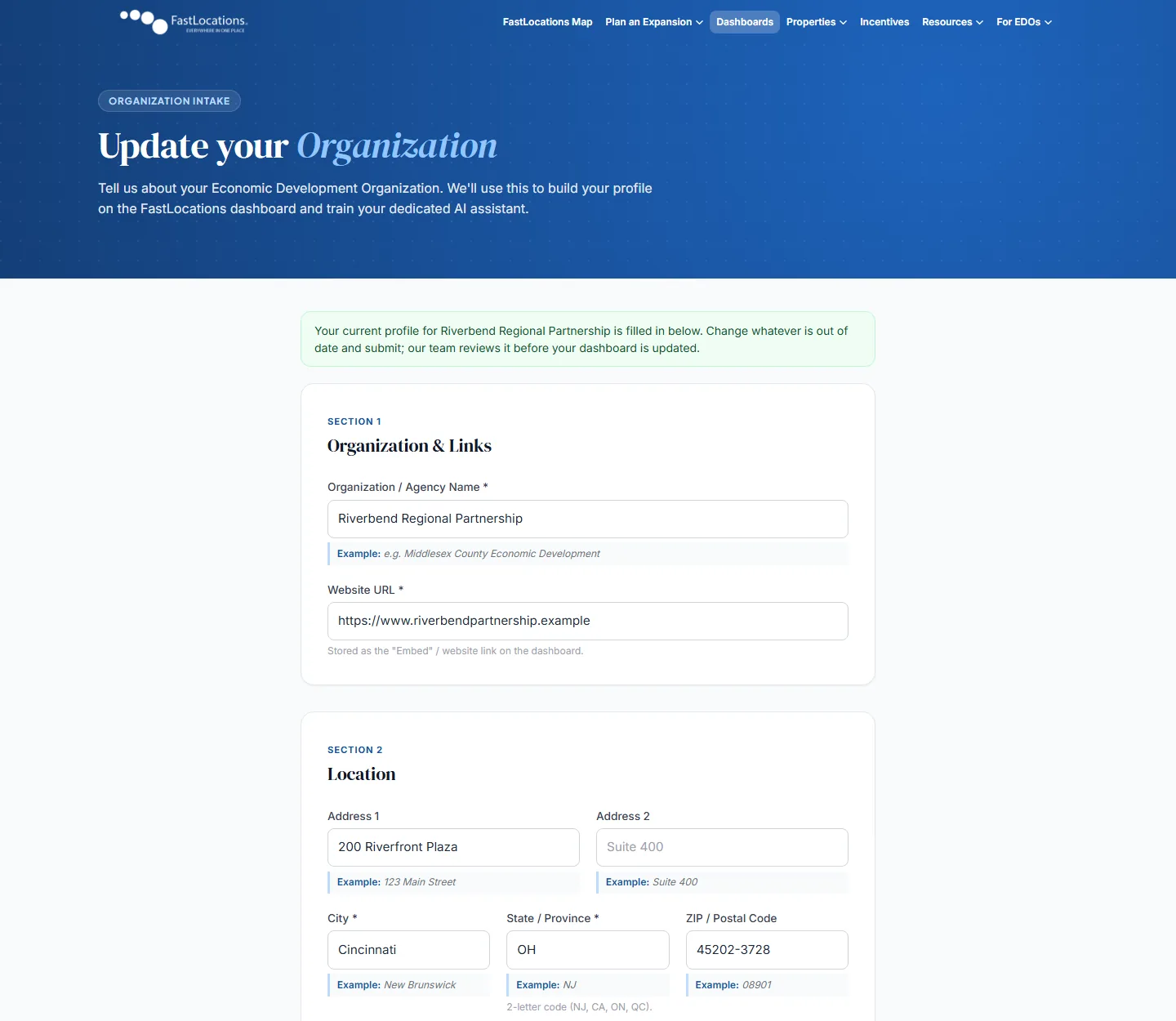
Updating your profile: your current details arrive filled in, and our team reviews each change before your dashboard is updated
11Getting Listed
Getting listed: how it works
Adding your community to FastLocations is a structured onboarding process designed to get your region in front of site selectors quickly and accurately.
-
Start your profile
Sign up here to begin onboarding. Once you provide your basic community details, our team begins building your custom environment.
-
Data sync
Our team trains your Assistant from your official website and property database. We incorporate any additional data or strategic documents you provide.
-
AI configuration & review
The FastLocations team builds your listing and fine-tunes your Assistant's context. You review the profile and approve the narrative before activation.
-
Go live
Your organization is activated on the map. Site selectors can now discover your community and engage in real-time conversations with your dedicated AI Assistant.
-
Dynamic updates
As sites are occupied, programs evolve, or new assets emerge, your profile updates to reflect current reality.
Ready to put your community on the radar? Activate Your Account Today.
12Your EDO Portal
One sign-in for everything your organization manages
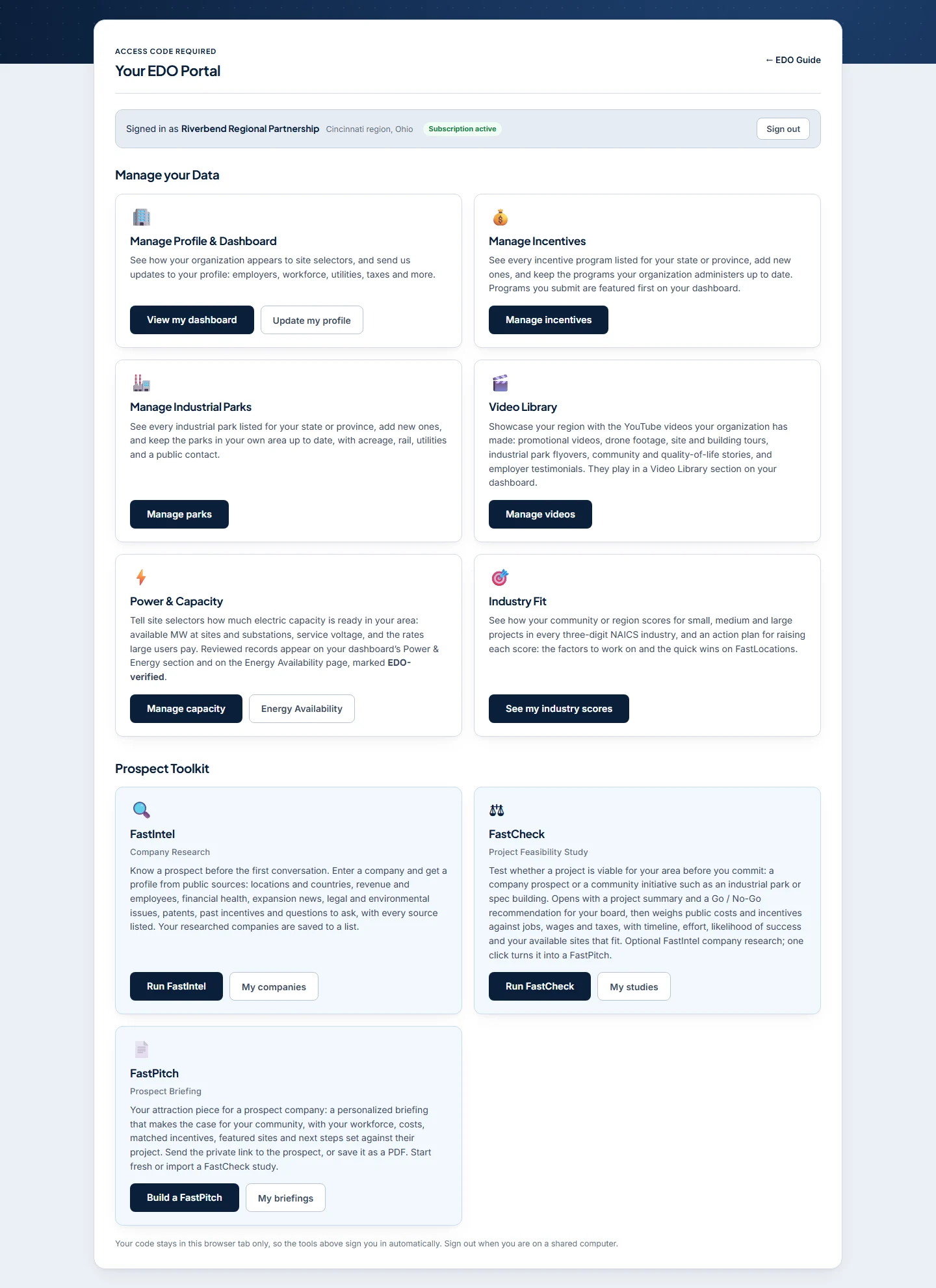
The EDO Portal is your organization's private workspace on FastLocations. From one page you keep your listing current (profile, incentives, industrial parks, videos and power capacity), see how your region scores by industry, and use the prospect and project tools that come with your subscription.
Manage your data
Profile & Dashboard, Incentives, Industrial Parks, the Video Library, Power & Capacity and Industry Fit: what site selectors see about your region, and how it scores by industry.
Prospect & project tools
The Prospect Toolkit: FastIntel company research, FastCheck project feasibility studies and FastPitch prospect briefings. Work you do for your board, your council and your prospects.
Signing in
Each subscribing organization receives an access code (in the form FL-XXXX-XXXX). The code identifies your organization, so there is no username or password to manage, and one code opens every tool in the portal.
- Your code stays in that browser tab only, and the tools you open from the portal sign you in automatically.
- Forgot your code? Use Forgot your access code? on the sign-in page and it is emailed to the address on file. Codes are never shown on screen.
- On a shared computer, use Sign out when you are done.
Manage your data
Profile & Dashboard
See your organization exactly as site selectors do on your Ai+Plus Dashboard, then send us updates to the profile behind it: major employers, workforce, utilities, taxes, permitting, housing and more.
- View my dashboard opens your live dashboard.
- Update my profile opens the profile form with your current details filled in (shown under Your Profile). Our team reviews each update before it goes live, so your listing stays accurate.
- Electricity & Grid keeps your commercial and industrial electric rates together with your grid description. Add the rates you quote to prospects: they appear in your dashboard's Complete Data Profile and in Compare, alongside the published price figures in your Power & Energy section.
Manage Incentives
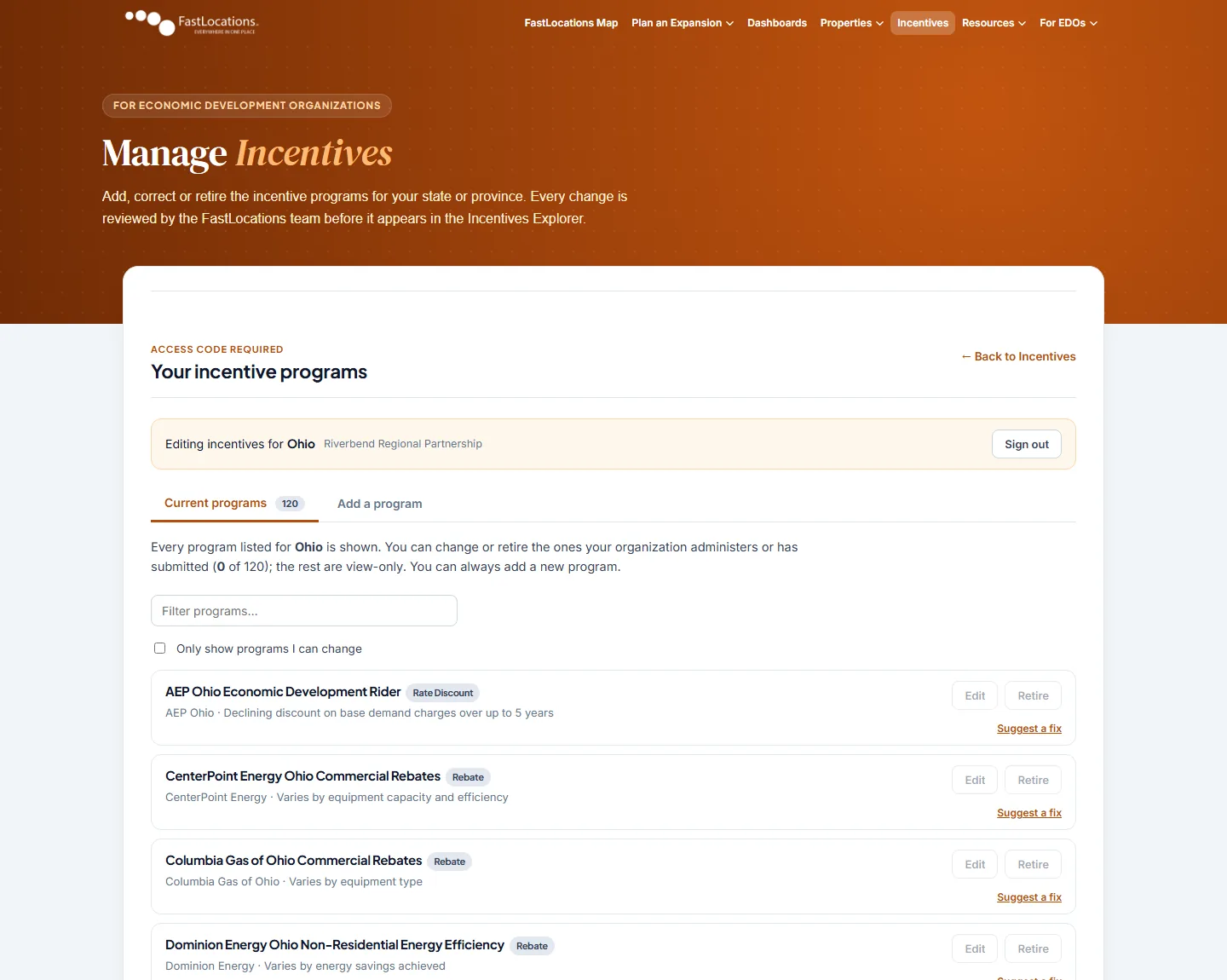
See every incentive program listed for your state or province in the Incentives Explorer, add the ones that are missing, and keep the programs your organization administers up to date.
- Add a new program, correct an existing one, or ask for one to be retired when it ends.
- Programs your organization submits are featured first on your dashboard.
- See an error in a program run by someone else? Suggest a correction and we will check it, with the administering organization if needed.
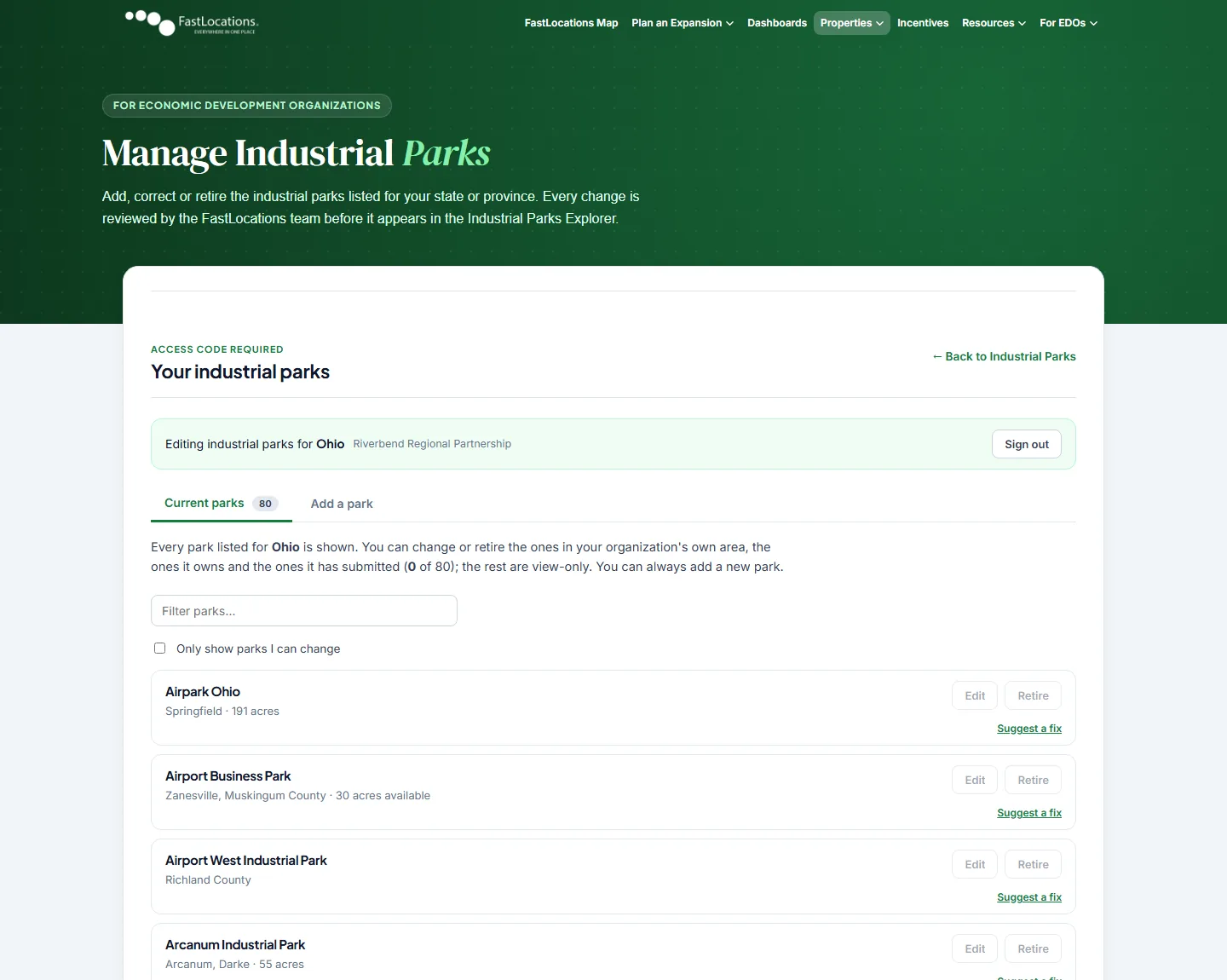
Manage Industrial Parks
See every industrial park listed for your state or province in the Industrial Parks Explorer. Add new parks and keep the ones in your own area up to date, including acreage, rail access, utilities and a public contact.
- Parks in your own area can be added, updated or removed.
- For a park outside your area, you can suggest a correction for our team to review.
Video Library
Showcase your region with the YouTube videos your organization has already made. They play in a Video Library section on your dashboard, right where site selectors are evaluating you.
- Good choices: promotional videos, drone and aerial footage, site, building and industrial park tours, community and quality-of-life stories, workforce and training programs, and employer testimonials.
- Paste a YouTube link. The title comes from YouTube unless you write your own, and you can add a short description.
- Up to 24 videos. The first one is featured. Videos must be Public or Unlisted on YouTube with embedding allowed.
Power & Capacity
Tell site selectors how much electric capacity is ready in your area. Reviewed records appear in the Power & Energy section of your dashboard and on the Energy Availability page, marked as verified by your organization.
- Add a site or industrial park with power available, substation or feeder headroom, or a rate or tariff for large users.
- Include available and total MW, service voltage, the all-in rate, the serving utility and when the capacity is available.
- Enter only capacity your utility partners have confirmed. Energy Availability opens the public page, filtered to your state or province.
- While a change is in review, the approved version stays online. Retiring a record removes it at once.
Industry Fit
See how your community or region scores for 85 industries (three-digit NAICS codes), each for a small, medium and large project. The scores come from the same model site selectors use on FastLocations, so they show where your region already competes and where it falls short.
- 50 is the typical county in your country for that industry and project size. 70 and up is a strong fit, 55–69 competitive, 40–54 developing and under 40 a weak fit.
- Each industry is weighed on what that kind of project needs: workforce and skills, education, infrastructure and power, logistics, incentives, real estate, costs and the industry's existing presence in your area.
- A territory's score is 60% the average of its counties and 40% its strongest location, so one good county doesn't make the whole region a strong fit.
- How to improve on any industry opens an action plan: what drives the score, steps for each weak factor with the points they could add, quick wins on FastLocations (listing sites, verifying power capacity) and the strengths to lead with when you pitch.
- Download the scorecard as a PDF or a CSV, or print a single action plan.
Prospect & project tools
FastIntel · Company Research
Know a prospect before the first conversation. Enter a company name (a website helps when the name is common) and in about a minute you get a research profile built from public sources:
- What the company does, its products, markets, ownership and parent company.
- Revenue, growth, employees and financial health.
- Every known location, by country, plus expansion drivers, recent milestones and announced projects.
- Operational, site and workforce needs, legal and environmental issues, patents, and incentives it has received before.
- Questions to ask the company, based on what was found and what was not, and a list of sources with a confidence rating.
Everything your organization researches is saved to Your researched companies, so you can reopen it any time and download it as a PDF or a Word document. Both carry the FastLocations header, your organization's name, the full list of sources and a disclaimer, and is named after the company. Research on a company is reused for 30 days unless you choose to research it again. The same research can also be added to a FastCheck study.
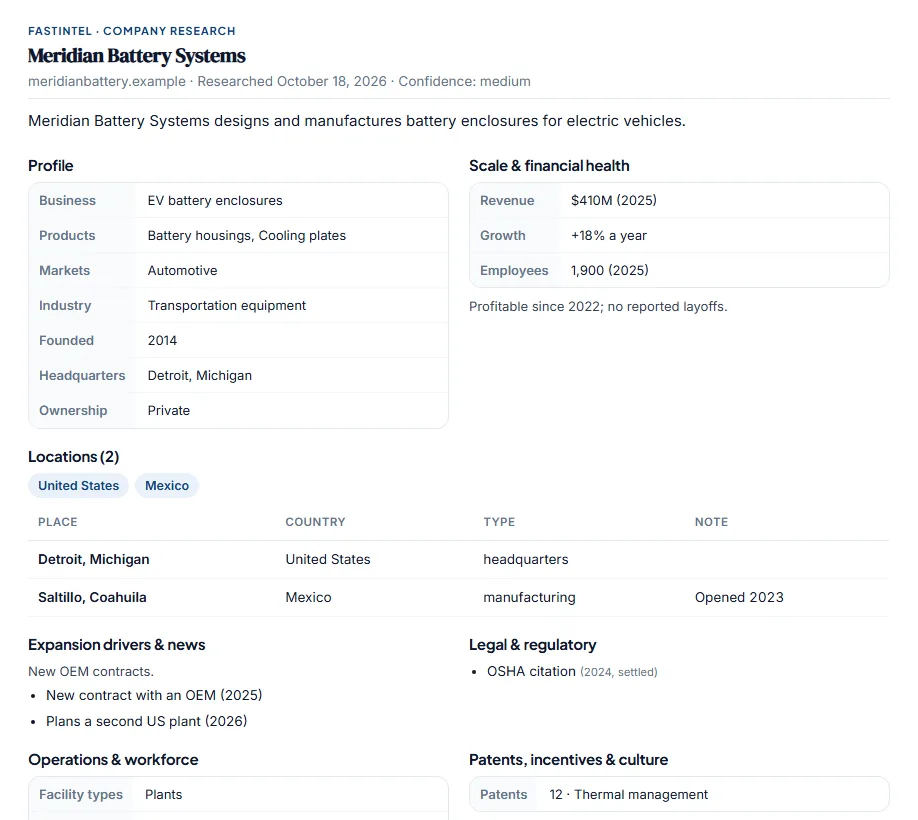
A research profile (example company)
FastCheck · Project Feasibility Study
Test whether a project is viable for your area before you commit. A study can cover a company project (attraction, expansion or retention) or a community initiative such as an industrial park, spec building, innovation hub, training center, downtown project or tourism venue.
Five steps take you from the project and its public costs and incentives to a results page. Optional details make the study sharper:
- Industry / NAICS: choose codes with Browse codes, a searchable list of sectors and subsectors, to sharpen the industry-cluster match.
- Your property listings: if your sites and buildings are on FastLocations, the study suggests them as you type a site name. Picking one fills in its size and status, and the results list your available sites that fit the project.
- Preferred location: the city, town or county the project prefers. Listings there rank first.
- Research this company (company projects): adds a profile built from public sources, covering locations, revenue and employees, financial health, expansion news, legal issues, past incentives and questions to ask. Already researched the company with FastIntel? Step 2 opens by asking whether to start from a FastIntel profile: pick one of your saved companies and FastCheck fills in the company and reuses that research instead of running a new search. It also suggests a profile when the name you type matches one.
The results page shows:
- A project summary at the top: a fact sheet, a short written analysis and recommended next steps.
- Asset readiness, a 0–100 score across workforce, power, water, logistics, site, permitting, housing, hazards, incentives, operating cost and industry clusters, drawn from your dashboard data.
- Economic and fiscal impact: jobs, payroll and new residents, and local revenue weighed against public costs, with net present value, benefit-cost ratio, payback and cost per job.
- Timeline, effort and likelihood of success, with a risk register and suggested mitigations.
- A Go / No-Go recommendation. It is rule-based, and every assumption is listed and can be adjusted.
Download the results as a PDF or as an editable Word document, charts included, ready for a board packet.
Each study is saved to a private link you can share with your board or council. Confidential company names and company research are never shown on it. When the project is ready to pitch, Create A FastPitch carries the project, matched sites and chosen state programs straight into FastPitch. My studies in the portal lists your studies so you can view, edit or delete them.
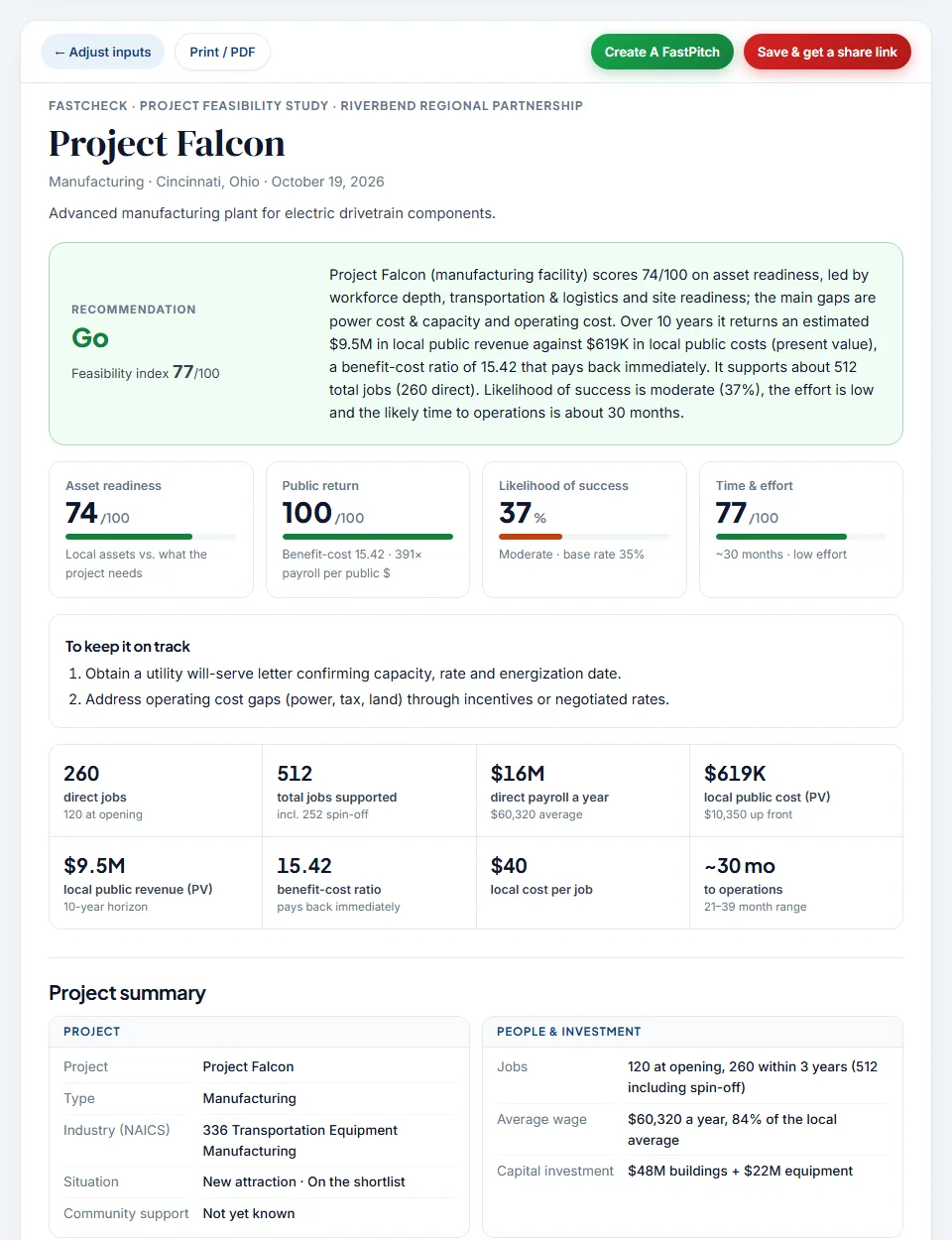
Results, with the recommendation and project summary (example study)
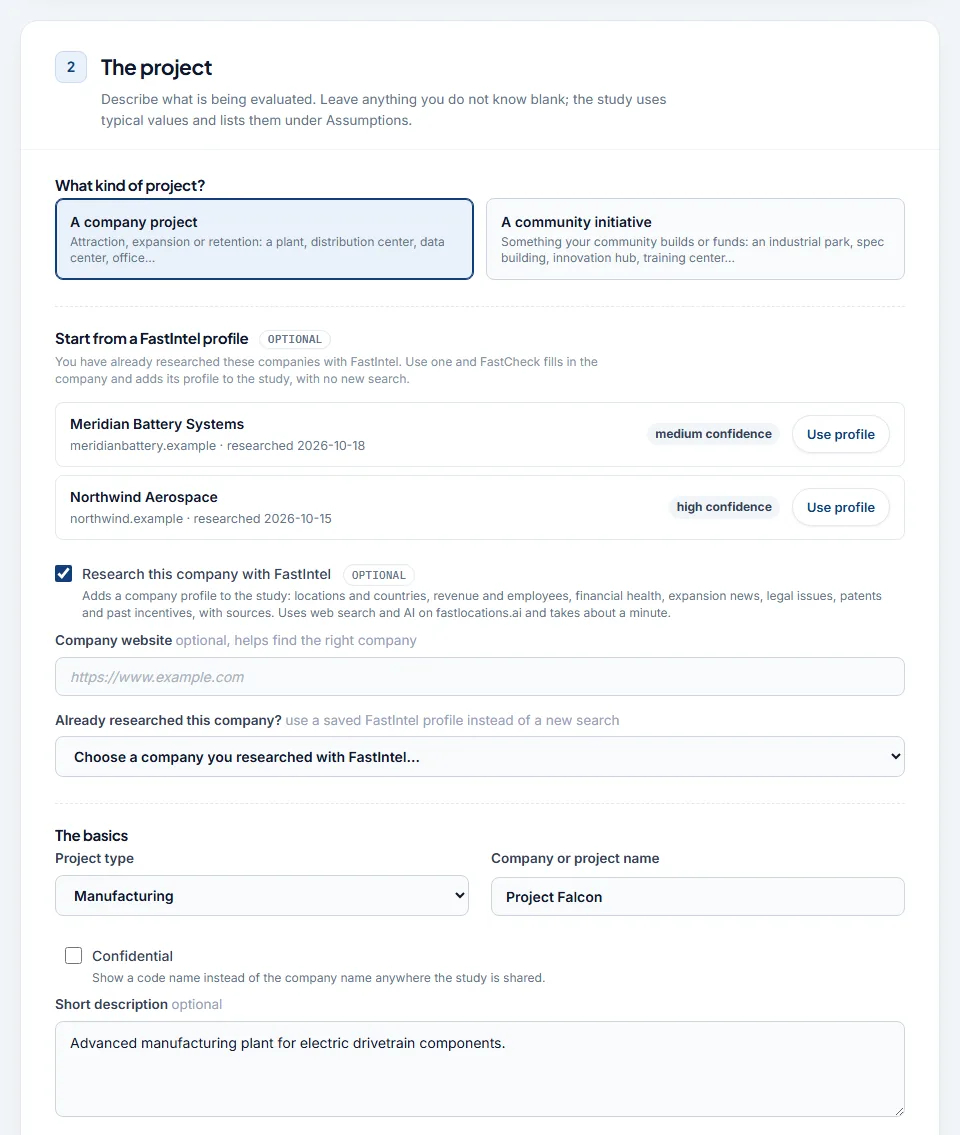
Step 2: describing the project
FastPitch · Prospect Briefing
Your marketing and attraction piece for one prospect company. In three short steps, FastPitch sets your region's workforce, costs, matched incentives and featured sites against the company's own project and makes the case for your community. You send it straight to the prospect.
- It combines your answers with your dashboard profile, trend data, regional workforce figures, the state incentives that best match the project, and the properties you choose to feature.
- Import a FastCheck study: step 1 lists your saved company studies. Import one, or use Create A FastPitch from the study itself, and the project, matched sites and chosen programs arrive prefilled, with each prefilled field marked. An unfinished briefing is restored the next time you open FastPitch.
- Browse codes helps you pick the company's NAICS industry codes.
- The briefing is published at a private link you send to the prospect. They can open it anywhere or save it as a PDF and, with Ai+Plus, ask your AI Assistant questions right on the page. You can also download it as a PDF, or as a Word document led by your logo to adapt for a proposal.
- Your edit link lets you revise the briefing at any time, and saving updates the same link, so anyone you sent it to sees the new version.
- Enhance with AI rewrites the narrative for the prospect using only the figures in the briefing. The new version opens as a preview: your prospect keeps seeing the current narrative until you choose Keep this version, and Revert puts it back. You can return to the standard narrative at any time.
- Your logo leads the briefing, and the header adapts to it: white logos and logos on a dark background get a dark header that matches them.
- My briefings in the portal lists every briefing your organization has made, with View, Edit and Delete.
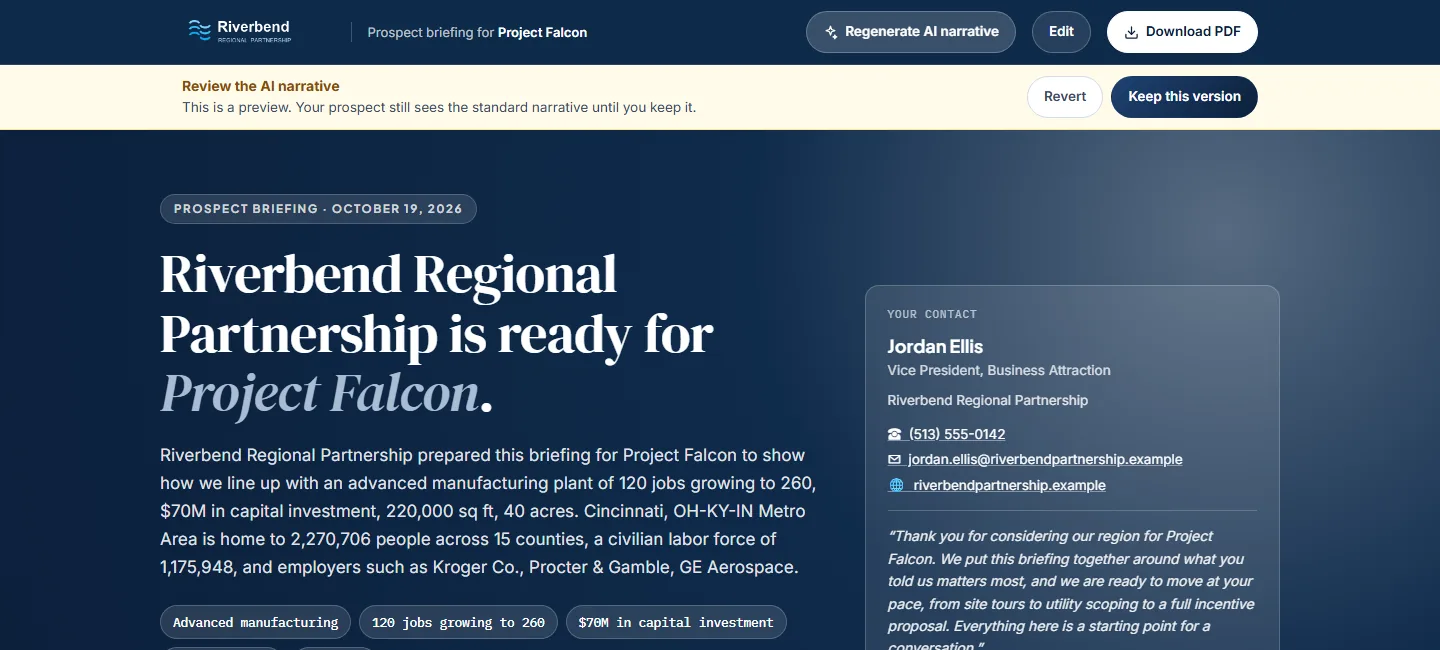
Reviewing an AI narrative before the prospect sees it (example project)
13The Competitive Reality
Who else is showing up when site selectors search your region?
In a data-driven search, silence is a rejection. When corporate decision-makers evaluate industrial sites in your region, they only see who is represented. If your competitors are listed and you are not, you aren't just losing the comparison — you’re losing the chance to be compared at all.
Being on FastLocations isn't just about technology. It's about being at the table when investment decisions are made.
Economic development has always been about relationships. FastLocations gets you into the relationship sooner, better prepared, with a site selector who already understands what your community has to offer.
The first conversation starts before the phone rings. Make sure you're part of it.
?FAQ
Questions economic developers ask us
Which organizations can be listed?
State, regional, and local economic development organizations, utilities and rail, industrial parks, megasites, and port and airport authorities. Your plan level depends on your organization type and the population or jurisdictions you serve.
What's the difference between a Basic Map Listing and Ai+Plus?
A Basic Map Listing puts your organization on the GIS map with a direct link to your agency website. Ai+Plus plans add your own AI Assistant, trained on your data, and an Ai+Plus Dashboard for your region.
How much does it cost?
Plans are billed annually and priced by organization type and the population you serve. See current plans and pricing on the Activate page.
Who owns and approves our data?
You do. Your Assistant is trained from your official website and any documents you provide, and you review your profile and approve the narrative before it goes live. Property listings link back to their original source.
How do site selectors reach us?
Your listing includes your team's direct contact information, and your Assistant can share it during a conversation. Warm leads route directly back to your team.
Will we see the projects site selectors are running?
No. Project details entered in My Project are confidential and never shared with any organization. That confidentiality is why site selectors are willing to run real projects on the platform — and when they're ready, they contact you already informed.
What if our information changes, or the Assistant gets something wrong?
Your profile is updated as sites are occupied, programs change, or new assets come online. If you spot anything out of date or inaccurate, email info@fastlocations.ai and we'll correct it.
How long does it take to go live, and how do we pay?
You'll receive a confirmation email right after payment, followed by a notification when your agency's Assistant is live. Payments are processed securely by Stripe; for other payment methods, contact info@fastlocations.ai.
Ready to put your community
on the map?
Connect with the FastLocations team to activate your custom AI Assistant and start engaging active site selectors today.
Activate Your Account